Creating notifications
Once you have created notification channels and templates, you can create the actual notifications that can be applied to policies. Each notification uses a selected channel and template and is distributed according to the frequency you specify.
To create a new notification:
-
Click the Notifications tab and click New.
-
Enter a Name (required) and a Description (optional).
-
Select a notification Category.
-
Select a Notification Channel.
-
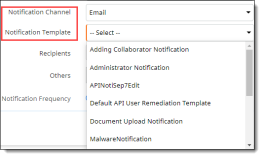
Select a Notification Template. The templates in the dropdown list depend on the channel you selected in the previous step.
-
Depending on the notification channel you selected, you will be prompted to enter additional information. Here are two examples:
-
For an email channel:
-
Select an email template, then check the types of recipients. If you checked Others, enter recipient names separated by commas.
-
Select a notification frequency – Immediate or Batched. For Batched, select a batch frequency and a time interval (minutes or days).
-
For a Slack channel:
-
Select a notification template.
-
Select one or more Slack channels.
-
Save the notification.
The new notification is added to the list.